Excel2DWG™
Excel2DWG is a revolutionary new way to solve the old problem of placing Excel spreadsheets into CAD & Design applications. It runs completely inside Microsoft Excel, directly creating a DWG or DXF file as its result. You simply select your area of interest and click an icon to create the DWG file. The best part is that as changes are made in Excel, the DWG files are updated when the spreadsheet closes. That means the next time the CAD project opens, the referenced spreadsheet drawing reflects these changes!
These DWG files (residing in the spreadsheet folder by default) can be referenced by any DWG compatible software. That means AutoCAD (even LT), Revit, Inventor, DWG Compatibles (BricsCAD, IntelliCAD, others) and even MicroStation can open, externally reference (or insert) the same file!
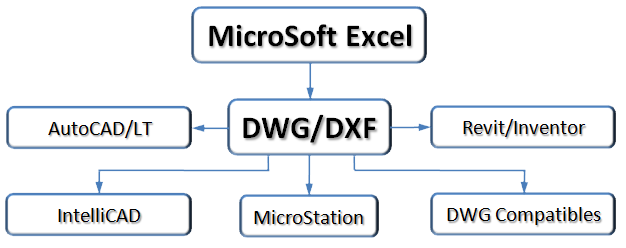
With years of experience in this area, we found that most groups use a mixture of products in completion of projects. Now those groups can reference a single file across the entire project, regardless of the application!
User Interface
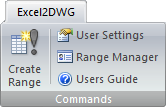
The application is controlled (in Excel 2007 or higher) by its own ribbon tab making it easy to select and execute the application. On Excel 2000-2003, it has its own separate toolbar with icons.
System Settings
This dialog controls all the defaults for newly created spreadsheet references. It includes settings for overrides, factors and other options. By default, all output files go to the same folder as the spreadsheet. You can also designate a single folder for the DWG/DXF files.
Range Manager
This dialog supplements Excel's Name Manager and allows you to rename, delete, identify, and purge named ranges. You can also select multiple ranges and reprocess them, updating the DWG/DXF file referencing the range.
Smart Updating
When you open a spreadsheet containing multiple linked areas, the program detects changes made to the spreadsheet. This means that when you close the spreadsheet, only the DWGs of ranges with changes are updated!
Features Supported:
|
|
|
Additional Features
- Uses named ranges, allowing the table to grow/shrink as you add/remove rows or columns.
- Manage multiple spreadsheet ranges on multiple sheets easily.
- Exclusive column wrapping. Users can specify the maximum column height and gap distance. The table will flow to the designated height, then move up and to the right to continue until done.
Optimized Results
We understand that you want to keep your drawing size small with fast regeneration times. That's why we optimize the geometry we create. If the same lineweight is used across the entire row, we create one line, not one for each cell. We also merge adjacent fills and hatches resulting in the smallest drawing possible.
Licensing
The program resides exclusively inside Excel and all the work is done from that application. Therefore, you need a Excel2DWG license for each Excel seat that will be involved in editing spreadsheets that CAD users need to reference.
Requires:
- Excel 2000 or higher.
- DWG 2000 Compatible software.
- Microsoft Windows XP or higher.
- Microsoft .NET Framework 2.0 or higher.
(Free download from Microsoft, likely already installed)
Documentation: Installs with the software and is available on-line.
Product Support: Email Support Only: Contact us!
Product Eval: Available on Request.
License Type: Perpetual (Never Expires)
Pricing: The more you buy, the more you save!
| Item | Price | Save | Purchase |
|---|---|---|---|
| Single: | $180.00 | Buy Now | |
| 5-Pack: | $855.00 | 5% | Buy Now |
| 10-Pack: | $1620.00 | 10% | Buy Now |
| 15-Pack: | $2295.00 | 15% | Buy Now |
| 20-Pack: | $2880.00 | 20% | Buy Now |
Upgrade Pricing: Contact us for discounted upgrade pricing.